Thursday, May 30, 2013

Twitter for a show? Consider saying no

Hey there,

This is a bit of a personal rant, but here it goes.

It stemmed from a recommendation for friends thinking about creating a Twitter account for a theatre show (like for a Fringe Festival):

Please don't.

Especially if you already have a handle for yourself or your production company.

And if you don't, then make your own, make it personal.

If anything, create a hashtag campaign, and use actual event pages, and be strategic. Unless you're expecting and preparing to produce the show indefinitely, dedicating a Twitter account might ultimately end up being a waste of time and digital space.

I say this because far too often, as I do some seasonal cleaning, I come across Twitter accounts that have not been active since the show closed, with no obvious sign of continued or future engagement. This ends up just becoming more work for me, to go through and prune, so to speak.

I know, it's selfish, but that's because my Twitter account is about me on bad days, and about "us" on good days.

And, to my original issue, most of the time a twitter account has been created for a show, it's had little to in terms of engaging with me and ends up simply being another means for broadcasting content at me.

So I suppose in the end, my point is not necessarily don't do it. But it is not to do it just to do it, just because everyone else is doing it. If you're going to set up a twitter account for a show, be intentional about it, be consistent, and make sure it will be sustainable after the festival is over. And treat it as another aspect of the performance experience, which might occasionally mention ticket sales and show times, but most of the time will have the kind of content that will inform and entertain your audience, along with prompts that will help get the conversation going.

Obviously this is a much more complicated issue, and this is only scratching the surface. And ultimately, i you aren't able or willing to put the additional time or effort into a solid social media campaign and strategy, if you think that it's just as simple as automating and sync-ing posts between platforms (which I blogged about on my personal blog), then you probably shouldn't create a Twitter account just for this one show.

But that's just my two cents. What do you think?

Monday, April 22, 2013

Online connections drive real world attendance


Hey there,

So I had the pleasure of sitting on a panel on Audience Engagement, as part of the 2013 Emerging Arts Leaders Symposium at American University. Podcast of all of the panels should be up online soon and be available up on the History page.

Anyway, we were asked a number of questions to prepare to discuss, but we fortunately actually had a wonderfully conversational flow driven by my fellow panelists, engaged attendees. and a wonderful moderator, Ximena Varela.

One of the questions was:
"What is the effectiveness of social media in this arena?"
And in doing some homework, in my Google search for "audience engagement art", one of the results was a report on Audience Engagement from the Pew Internet & American Life Project, and the report was just published this past January. Anyway, I wanted to share one particular set of stats, and since the conversation was so great during the symposium we didn't get around to the questinos, I figured I should at least share it here.

In case you didn't know, this was the purpose behind this study, from the report's Introduction: Evaluating the Arts in America:
The Pew Research Center’s Internet & American Life Project (PIP) designed this survey to understand how arts organizations are using the internet, social media, and other digital technologies to connect with the public. 
The stats were from Section 4: Social Media Use. Which is kinda my main domain and obsession. And so I wanted to share this particular excerpt.
Adults who connect with the arts through social media are much more engaged 
In an August 2011 nationally representative telephone survey of U.S. adults, conducted by Pew Research Center’s Internet & American Life Project, respondents were asked about different ways they engage with cultural institutions such as museums, arts organizations, and performers. At that time: 
  • 44% of all adults had attended a live music, dance, or theater performance in the 12 months prior to the survey; among those who follow a music/dance/theatrical group or venue on a social networking site, the figure climbs to 77% 
  • 35% of all adults had visited a museum in the last 12 months; among those who follow a museum on a social networking site, the figure is more than double at 82% 
  • 35% of all adults had attended an arts, craft or music festival in the last 12 months; the figure is 55% when looking just at those who follow individual artists, musicians or performers on a social networking site 
  • Finally, 29% of all adults had visited an art gallery, show, or exhibit in the last 12 months. The figure is almost three times as high (82%) among those who follow an art gallery or other visual organization on a social networking site 
These data suggest that adults that connect to arts and cultural organizations through social media are much more likely to attend events and exhibits than those who do not. Presumably, many adults who follow these institutions on social media do so because they are already patrons. Yet given their power to “hook” patrons and expand audience through these platforms, arts organizations may see tremendous dividends in social media properties that are informative, engaging, and relevant to their audience.
That's huge!! Online engagement driving real world action, and not taking away or replacing it like some might fear. And I think it's that last sentence that is particularly crucial, in terms of being "informative, engaging, and relevant" on social media, which isn't done as much as it should be. Too often I see artists and organizations being really good at sharing what can be purchased, for how much, and where, while not including the why.

But I digress, these numbers only tell part of the story!! Let's add one more statistic from Pew Internet: Social Networking.
As of December 2012, 67% of online adults use social networking sites.
That's 2 out of 3 adults who are on the world wide web.

And if you are someone who is trying to make the case for why your arts organizations should use social media and make the time to use it well to others in your organization, I highly recommend checking out the rest of both of the Pew links I shared. in this post.

Any questions, thoughts, other data you've found useful? Please share 'em in the comments,

JR

Thursday, April 18, 2013

Want to claim your Facebook Interest page?

Hey there,

So some of you might be asking what an Interest page is (and if your aren't, then just skip to the next paragraph, and while there's no question I could find answering that on Facebook, well...the best I could do is say that it's like a community page, except you aren't able to claim it (to my knowledge).

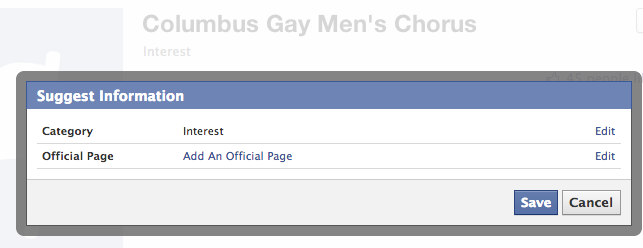
This came up when a fellow social media manager with another GALA Choruses member chorus asked how to go about claiming their interest page. After google'ing and looking at Facebook's help section, as well as exploring the interest page in question, here's what I came up with.
Hey M------, to answer your question (at least what little I could find out personally, it doesn't seem taking ownership is something that's possible. The best you can do is edit the page and "Add An Official Page". 

Unfortunately, only certain types of organizations are allowed to added: 
 
"Is Columbus Gay Men's Chorus an unofficial Page about a brand, celebrity, or organization? If so, enter the official Page here. This is a way to show that this Page is about a brand, celebrity or organization, but doesn't officially represent it." 
As you can see, when you just type in "Gay Men's Chorus", GMC's which are categorized as musician/band (which I suppose falls under the celebrity category) pop up, but as CGMC's type is "Music Store", that might not fall within their parameters of association. 
Just a working theory at this moment, though. Curious what others have found out and know about this.
So, yeah. Anyone else have any experiences with this? Does this jive with your own interactions with interest pages? Is there actually a way to go about claiming yours? Please let me and other curious minds know, in the comments.

JR

Saturday, April 6, 2013

You have less than 140 characters

Hey there,

Twitter...140 characters or less, right? Well technically. In their New user FAQ, they explain the rhyme and reason behind this.

But that's 140 characters total. For text. Text which might be a hashtag. Text which might be a link. Text which might be a link to a picture.

And of course any combination of those.

Fortunately, Twitter helps you out by counting how many characters you have left, right next to the "Buffer" & "Tweet" buttons, the former of which you might not have installed as a plug-in on your own browser, so don't worry if you don't see that one.


So, for example, with my work at Dance Place, one of my main goals is to always make room for #dcdance.


And now I have 132 characters left to type what I need to. Sometimes if there's a program that's multidisciplinary, I'll just use #dcarts instead.


Which is great because it gives me one more character than #dcdance. But more often than not, I'll actually try to use both, to tap into the discipline specific conversation, as well as the larger arts-wide one, in DC.


And there goes my count...down to 124 characters. Now, one of the neat things with Twitter is that at some point they started shortening links for you. Anytime you post a link in Twitter, it now only takes up 20 characters, which you don't necessarily see.


So yeah...it's a little more than 20 characters. And here's a piece at NBC attempting to explain why. Now you might be asking, what if I use a URL shortening site, like bit.ly or something. Then, it is no longer a URL shortening mechanism, but a lengthening one.


If anything, maybe it would be more appropriate to describe Twitter's link service as a standardizing one, as any link, however short or long, will take up 22-23 characters. Now this is actually related to uploading photos in Twitter.


As you can see, it even says that the image will appear as a link, a link of 23 characters. But I try to be an all-the-above kind of guy. If possible, I want the image, I want the link, I want the hashtags, but you try to put all of those in?


And all of a sudden you're left with just 78 characters of saying what you need to say. So, honestly, 2 out of 3 ain't too bad.


But I will almost ALWAYS include the hashtags as one of those elements. You might be wondering what happens if you go OVER 140 characters?


It's the highlight in red.

Anyway, that's that. Moral of the story, know what you're actual character limit is based on the elements I would recommend requiring in your tweets. In this case, at least one hashtag and a link. That leaves me with 110 characters.

In fact, anytime you begin to type out a tweet, go ahead and put those elements in first. This is actually tip #5 in post listing ten twitter tips.

And this way, you're spending more time from the get go working with the space you actually have. Obviously, there are exceptions to this, especially exchanges which are more like conversations. So if this doesn't necessarily apply to how you're using twitter at any given moment, I'd actually take that as a good sign.

Hope this helps, and let me know what you think in the comments,

JR

Monday, April 1, 2013

Foursquare's Twitter mention for check-ins

Hey there,

Just a quick tip for Foursquare managers.

A disclaimer, though: in general I am almost religiously against auto-syncing between social media platforms. This is one of those exceptions, and the main difference is because this is content shared that is user-driven. And when it comes to your audience, your customers, you generally want to accommodate their choices.

In this case, it has to do with what happens when they check in to your venue or event. Foursquare gives them the option to share it to any social networks they've connected to their account. If you go to the "Tools" panel on your organization's page, you'll notice theirs a box underneath "Connected to @[YourOrg]", and it says:
"Mention me when customer check-ins are shared to twitter"


You WANT to check this box. I really can't think of any reason not too, other than maybe you don't have a Twitter account for your organization yet. But I'm always open to new ideas, and if you can think of a reason you wouldn't want this checked off, please share it in the comments.

The win-win for this is that you will then get a notification on Twitter, in real time, when someone's checked in to your venue or event and decided to share it on Twitter.

Not only does no such notification exist, to my knowledge, on Foursquare, but then you can Retweet and/or Favorite their check-in tweet. This is especially great if they took a photo. And I would say as a matter of habit, you should definitely reply to their tweet, thanking them, welcoming them, and wishing they have a great time, or something to that effect.
As you can see, not only did Grace check-in to the venue, but she checked-in to the event that evening, a feature I mention in the post on my event creating ritual.

Anyway, that's it. Make sure you have this feature enabled. It's just a win-win. Would love to hear your thoughts, but also any reasons you think an organization might have not to enable this. Leave any and all of these in the comments!!

JR

Friday, March 22, 2013

Facebook Friday: A selection of articles

Hey there,

Just thought I'd highlight some pieces from the last week that might be of interest. With all the noise and clutter over the week, wanted to provide another way to share content that might've easily been missed during the week, or that I might've missed myself.

So check out some of these pieces about Facebook news, including a reminder about metrics, advertising, hashtags, cover images, and tips for nonprofits.
  • 6 Facebook Metrics Marketers Should Be Measuring, 3/18/13 - "Do you track your Facebook marketing? Do you feel lost when you’re looking at your Facebook Page statistics? Well, you’re not alone. Facebook metrics can be overwhelming and most Facebook Insights terminology is still hazy for many of us."
    Read more at Social Media Examiner
  • Facebook's New Pitch to Advertisers: We Can ID Groups That Buy Your Products, 3/20/13 - "Facebook is now able to connect the dots between users on its network and their purchasing habits, and is using that data to pitch advertisers. To be sure, Facebook is not identifying users by name to advertisers. Instead, it is matching up its own data with that of partner Datalogix in a double-blind fashion."
    Read more at Mashable
  • Facebook Hashtags: What Will They Mean for Brands and Users?, 3/20/13 - "Facebook is shifting into territory occupied by networks like Twitter and Instagram with the re-introduction of a chronological newsfeed and hashtags. The WSJ reported this last week Facebook is moving to allow users to engage around topics by using a hashtag field in status updates, that would (presumably) be viewable openly by Facebook's 1 billion users."
    Read more at Social Media Today
  • Facebook Now Allows Calls to Action on Facebook Page Cover Images, 3/21/13 - "Without fanfare, it seems that Facebook may now be allowing calls to action on Facebook Page cover images. Take a look at the Pages Terms. Up until today, the 17th December version of the platform prevented any kind of marketing in the cover image, and also – as with any promoted image – text was not allowed to comprise more than 20% of the image area."
    Read more at Social Media Today
  • Facebook Shares Best Tips for Non-Profits, 3/21/13 - "Facebook's strategic partnerships manager Libby Leffler works to ensure non-profits and causes on Facebook understand how to use the platform to best reach their communities and make the strongest impact. She says the biggest struggle non-profits have with Facebook is not understanding how to best use the platform's tools to engage with their communities."
    Read more at Mashable
That's it for this week. Hope you found some of these useful!!

Let me know in the comments, what you think, and what you'd like to see more of,

JR

Tuesday, March 19, 2013

Creating events: my ritual

Hey there,

So I thought I'd just walk you through my ritual when creating event pages for a performance at Dance Place. It helps to do this all at once, so that I can save time copying and pasting the lowest common denominator, in terms of text.

I know, thank you captain obvious.

Anyway, I start by creating a new page to be added to our Facebook Events.


I make sure, in addition to including all the text that we might have on our website, but I also make sure to include the link to the event page on our site with specific instructions that people should share the link with any friends who aren't on Facebook.

I also make sure to take advantage of the "Tickets" field, which allows you to "Add a link for guests to buy tickets" at. And this should go directly to the ticket buying page, the last possible link you can copy and paste, because anything less kinda defeats the purpose.

If the company/organization performing has a Facebook page, I also include the URL.

Finally, I make sure to upload a photo in accordance to the relatively new layout and dimensions for event pages, which I blogged about recently here.

Next, I create an Event page on Google+.


I do this because it has the most text in common with the Facebook event. The only thing I change is to include a URL to the company's website, instead of it's Facebook page.

Next I add the performances to our Foursquare page's list of Scheduled Events, so people can check in, not just to our venue, but to what's actually happening.


This is pretty simple as the only info needed is the name of the event, the day, and then the start and end times.

Finally, I wrap up my event creating ritual by creating a pin on Pinterest, to add to our Season's board.


This doesn't take too long, so it justifies the fact that I'm not quite sure how functional it is, as of yet. I know Goldstar puts out ticket and event info, so maybe it's just a matter of time before Dance Place's audience and community, at least those on Pinterest, use it to start sharing upcoming events, maybe even as a way to collect pins of what they've seen. Who knows.

But Pinterest is pretty simple because all you have to do is upload the image, include the basic info (in which case I list the name of the company or title of the piece, the photographer, the dates, and then hashtags). As far as the link to our website? You get to add that in an edit after you upload the image and create the pin.

Anyway, that's that. Just thought I'd share. What's your event creating ritual? Are there any other places you create events? How far in advance do you create them?

Did you get any new ideas from this post? Or do you have any thoughts? Let me know in the comments,

JR