Showing posts with label social media. Show all posts

Monday, April 22, 2013

Online connections drive real world attendance


Hey there,

So I had the pleasure of sitting on a panel on Audience Engagement, as part of the 2013 Emerging Arts Leaders Symposium at American University. Podcast of all of the panels should be up online soon and be available up on the History page.

Anyway, we were asked a number of questions to prepare to discuss, but we fortunately actually had a wonderfully conversational flow driven by my fellow panelists, engaged attendees. and a wonderful moderator, Ximena Varela.

One of the questions was:
"What is the effectiveness of social media in this arena?"
And in doing some homework, in my Google search for "audience engagement art", one of the results was a report on Audience Engagement from the Pew Internet & American Life Project, and the report was just published this past January. Anyway, I wanted to share one particular set of stats, and since the conversation was so great during the symposium we didn't get around to the questinos, I figured I should at least share it here.

In case you didn't know, this was the purpose behind this study, from the report's Introduction: Evaluating the Arts in America:
The Pew Research Center’s Internet & American Life Project (PIP) designed this survey to understand how arts organizations are using the internet, social media, and other digital technologies to connect with the public. 
The stats were from Section 4: Social Media Use. Which is kinda my main domain and obsession. And so I wanted to share this particular excerpt.
Adults who connect with the arts through social media are much more engaged 
In an August 2011 nationally representative telephone survey of U.S. adults, conducted by Pew Research Center’s Internet & American Life Project, respondents were asked about different ways they engage with cultural institutions such as museums, arts organizations, and performers. At that time: 
  • 44% of all adults had attended a live music, dance, or theater performance in the 12 months prior to the survey; among those who follow a music/dance/theatrical group or venue on a social networking site, the figure climbs to 77% 
  • 35% of all adults had visited a museum in the last 12 months; among those who follow a museum on a social networking site, the figure is more than double at 82% 
  • 35% of all adults had attended an arts, craft or music festival in the last 12 months; the figure is 55% when looking just at those who follow individual artists, musicians or performers on a social networking site 
  • Finally, 29% of all adults had visited an art gallery, show, or exhibit in the last 12 months. The figure is almost three times as high (82%) among those who follow an art gallery or other visual organization on a social networking site 
These data suggest that adults that connect to arts and cultural organizations through social media are much more likely to attend events and exhibits than those who do not. Presumably, many adults who follow these institutions on social media do so because they are already patrons. Yet given their power to “hook” patrons and expand audience through these platforms, arts organizations may see tremendous dividends in social media properties that are informative, engaging, and relevant to their audience.
That's huge!! Online engagement driving real world action, and not taking away or replacing it like some might fear. And I think it's that last sentence that is particularly crucial, in terms of being "informative, engaging, and relevant" on social media, which isn't done as much as it should be. Too often I see artists and organizations being really good at sharing what can be purchased, for how much, and where, while not including the why.

But I digress, these numbers only tell part of the story!! Let's add one more statistic from Pew Internet: Social Networking.
As of December 2012, 67% of online adults use social networking sites.
That's 2 out of 3 adults who are on the world wide web.

And if you are someone who is trying to make the case for why your arts organizations should use social media and make the time to use it well to others in your organization, I highly recommend checking out the rest of both of the Pew links I shared. in this post.

Any questions, thoughts, other data you've found useful? Please share 'em in the comments,

JR

Thursday, April 18, 2013

Want to claim your Facebook Interest page?

Hey there,

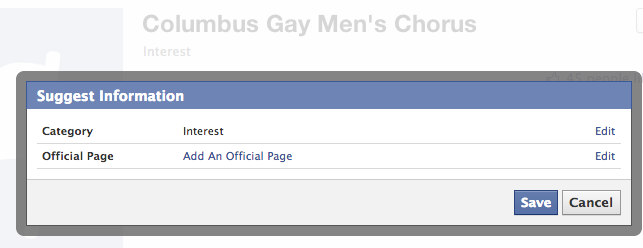
So some of you might be asking what an Interest page is (and if your aren't, then just skip to the next paragraph, and while there's no question I could find answering that on Facebook, well...the best I could do is say that it's like a community page, except you aren't able to claim it (to my knowledge).

This came up when a fellow social media manager with another GALA Choruses member chorus asked how to go about claiming their interest page. After google'ing and looking at Facebook's help section, as well as exploring the interest page in question, here's what I came up with.
Hey M------, to answer your question (at least what little I could find out personally, it doesn't seem taking ownership is something that's possible. The best you can do is edit the page and "Add An Official Page". 

Unfortunately, only certain types of organizations are allowed to added: 
 
"Is Columbus Gay Men's Chorus an unofficial Page about a brand, celebrity, or organization? If so, enter the official Page here. This is a way to show that this Page is about a brand, celebrity or organization, but doesn't officially represent it." 
As you can see, when you just type in "Gay Men's Chorus", GMC's which are categorized as musician/band (which I suppose falls under the celebrity category) pop up, but as CGMC's type is "Music Store", that might not fall within their parameters of association. 
Just a working theory at this moment, though. Curious what others have found out and know about this.
So, yeah. Anyone else have any experiences with this? Does this jive with your own interactions with interest pages? Is there actually a way to go about claiming yours? Please let me and other curious minds know, in the comments.

JR

Saturday, April 6, 2013

You have less than 140 characters

Hey there,

Twitter...140 characters or less, right? Well technically. In their New user FAQ, they explain the rhyme and reason behind this.

But that's 140 characters total. For text. Text which might be a hashtag. Text which might be a link. Text which might be a link to a picture.

And of course any combination of those.

Fortunately, Twitter helps you out by counting how many characters you have left, right next to the "Buffer" & "Tweet" buttons, the former of which you might not have installed as a plug-in on your own browser, so don't worry if you don't see that one.


So, for example, with my work at Dance Place, one of my main goals is to always make room for #dcdance.


And now I have 132 characters left to type what I need to. Sometimes if there's a program that's multidisciplinary, I'll just use #dcarts instead.


Which is great because it gives me one more character than #dcdance. But more often than not, I'll actually try to use both, to tap into the discipline specific conversation, as well as the larger arts-wide one, in DC.


And there goes my count...down to 124 characters. Now, one of the neat things with Twitter is that at some point they started shortening links for you. Anytime you post a link in Twitter, it now only takes up 20 characters, which you don't necessarily see.


So yeah...it's a little more than 20 characters. And here's a piece at NBC attempting to explain why. Now you might be asking, what if I use a URL shortening site, like bit.ly or something. Then, it is no longer a URL shortening mechanism, but a lengthening one.


If anything, maybe it would be more appropriate to describe Twitter's link service as a standardizing one, as any link, however short or long, will take up 22-23 characters. Now this is actually related to uploading photos in Twitter.


As you can see, it even says that the image will appear as a link, a link of 23 characters. But I try to be an all-the-above kind of guy. If possible, I want the image, I want the link, I want the hashtags, but you try to put all of those in?


And all of a sudden you're left with just 78 characters of saying what you need to say. So, honestly, 2 out of 3 ain't too bad.


But I will almost ALWAYS include the hashtags as one of those elements. You might be wondering what happens if you go OVER 140 characters?


It's the highlight in red.

Anyway, that's that. Moral of the story, know what you're actual character limit is based on the elements I would recommend requiring in your tweets. In this case, at least one hashtag and a link. That leaves me with 110 characters.

In fact, anytime you begin to type out a tweet, go ahead and put those elements in first. This is actually tip #5 in post listing ten twitter tips.

And this way, you're spending more time from the get go working with the space you actually have. Obviously, there are exceptions to this, especially exchanges which are more like conversations. So if this doesn't necessarily apply to how you're using twitter at any given moment, I'd actually take that as a good sign.

Hope this helps, and let me know what you think in the comments,

JR

Monday, April 1, 2013

Foursquare's Twitter mention for check-ins

Hey there,

Just a quick tip for Foursquare managers.

A disclaimer, though: in general I am almost religiously against auto-syncing between social media platforms. This is one of those exceptions, and the main difference is because this is content shared that is user-driven. And when it comes to your audience, your customers, you generally want to accommodate their choices.

In this case, it has to do with what happens when they check in to your venue or event. Foursquare gives them the option to share it to any social networks they've connected to their account. If you go to the "Tools" panel on your organization's page, you'll notice theirs a box underneath "Connected to @[YourOrg]", and it says:
"Mention me when customer check-ins are shared to twitter"


You WANT to check this box. I really can't think of any reason not too, other than maybe you don't have a Twitter account for your organization yet. But I'm always open to new ideas, and if you can think of a reason you wouldn't want this checked off, please share it in the comments.

The win-win for this is that you will then get a notification on Twitter, in real time, when someone's checked in to your venue or event and decided to share it on Twitter.

Not only does no such notification exist, to my knowledge, on Foursquare, but then you can Retweet and/or Favorite their check-in tweet. This is especially great if they took a photo. And I would say as a matter of habit, you should definitely reply to their tweet, thanking them, welcoming them, and wishing they have a great time, or something to that effect.
As you can see, not only did Grace check-in to the venue, but she checked-in to the event that evening, a feature I mention in the post on my event creating ritual.

Anyway, that's it. Make sure you have this feature enabled. It's just a win-win. Would love to hear your thoughts, but also any reasons you think an organization might have not to enable this. Leave any and all of these in the comments!!

JR

Friday, March 22, 2013

Facebook Friday: A selection of articles

Hey there,

Just thought I'd highlight some pieces from the last week that might be of interest. With all the noise and clutter over the week, wanted to provide another way to share content that might've easily been missed during the week, or that I might've missed myself.

So check out some of these pieces about Facebook news, including a reminder about metrics, advertising, hashtags, cover images, and tips for nonprofits.
  • 6 Facebook Metrics Marketers Should Be Measuring, 3/18/13 - "Do you track your Facebook marketing? Do you feel lost when you’re looking at your Facebook Page statistics? Well, you’re not alone. Facebook metrics can be overwhelming and most Facebook Insights terminology is still hazy for many of us."
    Read more at Social Media Examiner
  • Facebook's New Pitch to Advertisers: We Can ID Groups That Buy Your Products, 3/20/13 - "Facebook is now able to connect the dots between users on its network and their purchasing habits, and is using that data to pitch advertisers. To be sure, Facebook is not identifying users by name to advertisers. Instead, it is matching up its own data with that of partner Datalogix in a double-blind fashion."
    Read more at Mashable
  • Facebook Hashtags: What Will They Mean for Brands and Users?, 3/20/13 - "Facebook is shifting into territory occupied by networks like Twitter and Instagram with the re-introduction of a chronological newsfeed and hashtags. The WSJ reported this last week Facebook is moving to allow users to engage around topics by using a hashtag field in status updates, that would (presumably) be viewable openly by Facebook's 1 billion users."
    Read more at Social Media Today
  • Facebook Now Allows Calls to Action on Facebook Page Cover Images, 3/21/13 - "Without fanfare, it seems that Facebook may now be allowing calls to action on Facebook Page cover images. Take a look at the Pages Terms. Up until today, the 17th December version of the platform prevented any kind of marketing in the cover image, and also – as with any promoted image – text was not allowed to comprise more than 20% of the image area."
    Read more at Social Media Today
  • Facebook Shares Best Tips for Non-Profits, 3/21/13 - "Facebook's strategic partnerships manager Libby Leffler works to ensure non-profits and causes on Facebook understand how to use the platform to best reach their communities and make the strongest impact. She says the biggest struggle non-profits have with Facebook is not understanding how to best use the platform's tools to engage with their communities."
    Read more at Mashable
That's it for this week. Hope you found some of these useful!!

Let me know in the comments, what you think, and what you'd like to see more of,

JR

Tuesday, March 19, 2013

Creating events: my ritual

Hey there,

So I thought I'd just walk you through my ritual when creating event pages for a performance at Dance Place. It helps to do this all at once, so that I can save time copying and pasting the lowest common denominator, in terms of text.

I know, thank you captain obvious.

Anyway, I start by creating a new page to be added to our Facebook Events.


I make sure, in addition to including all the text that we might have on our website, but I also make sure to include the link to the event page on our site with specific instructions that people should share the link with any friends who aren't on Facebook.

I also make sure to take advantage of the "Tickets" field, which allows you to "Add a link for guests to buy tickets" at. And this should go directly to the ticket buying page, the last possible link you can copy and paste, because anything less kinda defeats the purpose.

If the company/organization performing has a Facebook page, I also include the URL.

Finally, I make sure to upload a photo in accordance to the relatively new layout and dimensions for event pages, which I blogged about recently here.

Next, I create an Event page on Google+.


I do this because it has the most text in common with the Facebook event. The only thing I change is to include a URL to the company's website, instead of it's Facebook page.

Next I add the performances to our Foursquare page's list of Scheduled Events, so people can check in, not just to our venue, but to what's actually happening.


This is pretty simple as the only info needed is the name of the event, the day, and then the start and end times.

Finally, I wrap up my event creating ritual by creating a pin on Pinterest, to add to our Season's board.


This doesn't take too long, so it justifies the fact that I'm not quite sure how functional it is, as of yet. I know Goldstar puts out ticket and event info, so maybe it's just a matter of time before Dance Place's audience and community, at least those on Pinterest, use it to start sharing upcoming events, maybe even as a way to collect pins of what they've seen. Who knows.

But Pinterest is pretty simple because all you have to do is upload the image, include the basic info (in which case I list the name of the company or title of the piece, the photographer, the dates, and then hashtags). As far as the link to our website? You get to add that in an edit after you upload the image and create the pin.

Anyway, that's that. Just thought I'd share. What's your event creating ritual? Are there any other places you create events? How far in advance do you create them?

Did you get any new ideas from this post? Or do you have any thoughts? Let me know in the comments,

JR

Friday, March 8, 2013

Happy Belated Women's History Month

Hey there,

So by the time I posted a link on Facebook, I realized that my comment had turned into a blog post on its own....and here it is:
Happy International Women's Day, as I share this HuffPost Arts & Culture link forward, from my Hashtag the Arts page. 
Something I put out there for consideration, to other social media managers in the arts: if you aren't already, this is a great opportunity to highlight the women involved in your work and/or your organization's history, in terms of relevant and timely content to throw into your communications mix. Maybe even just in terms women that have inspired and influenced you and your company's mission. 
But that's just in the context of my FB page; obviously folks in any sector would do well to consider what they might be able to share throughout March. Unless you are already. And then all I have to say is "Kudos"!!
The link was 10 Female Artists to Watch in 2013. And I recommend liking HuffPost Arts & Culture's Facebook page, if you don't already, as well as follow them on Twitter, or at least list them.

Because sharing is caring, and a wonderful source like that will give you something to share in between the moments when you actually have the time and energy to put together your own content.

So whether this is already a part of your communication plan and strategy or not, would love for you to share whatever you've got in the comments here.

Also feel free to share it on Hashtag the Arts' Facebook page and tag it on Twitter to be considered for Retweeting!!

Finally, would definitely love to hear your feedback in terms of your thoughts, questions, aha moments, whatever you are willing to share,

JR

Wednesday, March 6, 2013

Different admin roles for Facebook pages

Hey there,

Just thought I'd briefly highlight the different admin roles that are your option for Facebook pages.

You've got:

  • Insights Analyst
  • Advertiser
  • Moderator
  • Content Creator
  • Manager
Here's a handy chart Facebook has, highlighting the different capabilities of each role.

As you can see, responsibilities are more or less cumulative.

For small arts organizations or ensemble, I'd probably recommend just worrying about the Manager, Moderator, and Insights Analyst roles, which the rest of this post will discuss.

First, you should definitely have more than one Manager. This is good housekeeping, should anything happen to the primary one, either a temporary situation (such as illness, technical issues, etc.) or permanent.

I would also encourage having a handful of people in leadership positions set as moderators on your page. Even if some aren't comfortable creating content and administering the page, in being a Manager, everyone should at least be knowledgeable and responsible enough to reply intelligently to comments.

And I think the Insights Analyst role is a great one for any individual who might not be great at engaging with your community, but they love crunching numbers.

Because, if you're not at least measuring your efforts and using the data you have on hand, someone else is. And ultimately, the more time you plan into seeing what works for you and your community, the type of content that engages them, the times and days, etc (all of which will continue to change as time goes on and your audience grows), you'll spend less time guessing and more time being effective and efficient with your engagement.

So if one of your main page manager's isn't doing this (which they should be, and that's advice I need to take myself), tag someone who will for the role.

Anyway, just thought I'd share. Having multiple admins functioning in various capacities is a great option to explore, plus it's an excellent way to make sure your social media presence and efforts aren't being silo'ed or happening in a vacuum, disconnected from the rest of the company or organization.

I will highlight the Content Creator and Advertiser roles in a future post, for anyone interested. Wanted to highlight some roles just as a starting point for those who might not have explored them that much, yet. In the meantime, let me know what you think about any of my suggestions, in the comments,

JR

Tuesday, February 26, 2013

Great FB cover photo example from the Sitar Arts Center

Hey there,

So I saw this awesome cover photo which the Sitar Arts Center just updated on their Facebook page. And as I was want to do, I shared it and began to write a comment...and then I kept writing.

By the end of it, I thought it'd be worth it to re-post it here as well. So first, here's the photo:


And here's what I had to say about it:
First, this is an aDORable photo!! Can't go wrong with kids. 
But, just wanted to share this awesome cover photo from the Sitar Arts Center, along with this, for consideration. 
Imagine a spectrum with your audience & community at one end,and your art, artists and/or arts org at the other. As much as you share images of your art and productions, you want to throw into the mix images of your community participating in your art events or programs. 
The latter will help give your Facebook fans, Twitter followers, etc. something (other people, specifically) to directly relate to in terms of what it looks like to experience your work, as audience member, as student, etc. 
Because at the end of the day it should be about them. And the more you make it about them, the more they'll be inclined to support you and your work.
You can check out the original post here on the blog's Facebook page. If you're on Facebook, please check it out, like it, share it, or add your own comment there.

I will just add this.

Obviously, arts organizations that have educational programs have a leg-up on being able to get this kind of media. And, this is a note for the individual teaching artists. If you don't implement this already, you want to have a photo/video release for and start capturing what you can of any of your classes, workshops and/or residences.

For arts organizations and presenters that just have exhibits and performances, take a look at opportunities to capture your audience, even if it's not at a moment when they're actually engaged in your work. Whether it's out in the lobby, a post-show discussion with your artists, the moment right before the curtain opens, an exhibition opening reception, etc.

Anyway, would love to hear your thoughts and experience. Do you do any of this already? If not, will you start doing this? What do you think of the Sitar Arts Center cover photo? And how much of this can or can't you use with your own work?

Let me know in the comments here and/or on Facebook,

- JR

Friday, February 22, 2013

New layout and dimensions for Facebook event photo

Hey there,

Just a quickie. A colleague in a Facebook group for Social Media Managers of LGBT choruses (yeah, I know, talk about niche), pointed out a change to Event pages.

In case you haven't had any reason to look lately, most of this should look familiar. This is a screen shot from an event page for Dance Place, where I work.


Notice that brand new button in the upper right hand section? Yeah, if you "Add Event Photo" it looks like this now.


And that new "cover" photo takes the place of the "profile" photo.

Here's the thing, as is stated at inlinevision's post on New Image Size for Facebook Event Images/Banners:
It’s a simple banner so why create another template? ...because Facebook only shows a small portion of the event image on your Facebook page in the thumbnail preview for Events, as well as a slightly different part of the image on the Events listings page.
Like so.


Inlinevision has a template you can download at their site, and all they ask is for your email in exchange. But if you're a DIY kinda social media person, the dimensions are roughly 714-731 by 200 pixels. I give the range because those are the two numbers I've read.

But for uploading sake, Facebook requests that it be at least wider than 400 pixels. Yeah...I know because I tried uploading something smaller than that.

It's tricky, right? You've gotta design something that looks good when fully displayed, as well as when a cropped thumbnail shows up in people's news feeds when it's shared. Which is why you might just want to download Inlinevision's tempalte!!

So yeah, new event photo dimensions and layout. Make sure your graphic design person knows!!

- JR

Thursday, February 14, 2013

Some Valentine's Day Love

Happy Valentine's Day,

Just thought I'd put up a quick post sharing some of the neat photos, organizations have been posting on Facebook.

Washington Performing Arts Society shared one forward, from the New York Philharmonic:


Gotta love good puns.

Arena Stage shared this show specific one, part of a set which you can check out on their Facebook page:


And last but not least, this one was an Americans for the Arts' post:


See any you've particularly liked, on Facebook or wherever? Share a link in the comments!!

- JR

Sunday, January 27, 2013

Ten Twitter Tips


Hey there,

Just wanted to share ten twitter tips. If you're familiar with Twitter, you'll probably recognize some common advice, as most of this is nothing new.

However, I wanted to share some that I thought were particularly crucial for artists and arts organizations who handled the basics, like setting up the account, and are taking baby steps forward. 

I actually listed them, but then looked for links to further elaborate on each.

Hope some of these help:
  1. If you are going to start a Tweet with a mention, make sure to put a period first if you want everyone to see it. Otherwise only people who are following you and the other person will see the "conversation". More on this at artsbizblog.
  2. Instagram photos are not previewed media in Twitter anymore. If you can, take the time to share it in Twitter, for those of your followers that aren't on and don't want to go to Instagram. More on this at CNN.
  3. Throw in a non-review quote every now and then. Inspirational or funny, broad or specific to your discipline (like from a notable artist in your field), you get the idea. Here are some quotes from the Marketing Mamma.
  4. The only person sync-ing to Facebook saves time for is you. Take the time to translate to Twitter, especially if you are mentioning artists or arts orgs on Twitter as well. Several more reasons at Leah Creates.
  5. Put in hashtag(s) and link first (if any), so you know how many characters you have left to work with. More about hashtags at Hubspot.com.
  6. Make sure you are monitoring Twitter during the weekend and/or any time you have events, not just during your office hours. Check out this post at Know Your Own Bone.
  7. If you're not using Twitter as a platform for your community to talk with you, then they will talk about you, for better or for worse. Read more about ignoring tweets at Young Entrepreneur.
  8. If you are tweeting for an organization, then make sure the organization is aware of pertinent communications, via the appropriate people (i.e. tweets from funders to the development team, local/regional arts agencies to the artistic and executive directors, partners to program managers, etc.). The social media manager needs to be integrated with and connected to everyone else at the organization. Check out this relevant post at social media today.
  9. Sharing is caring. Don't be afraid of retweeting other arts happenings in your area, especially if your space is dark between exhibits or shows.  People like when you use your platforms to be a resource for your community, and not just your own personal cheerleader. More on that at this Radian6 blog.
  10. Be yourself: an artist. Be creative and express yourself. :-)
Yeah, I figured that last one was self-explanatory.

Let me know what you think, if you have any questions, or other tips you'd add,

- JR

Sunday, January 20, 2013

Facebook 101: "Like" it as your page

Hey there,

So in the world of Facebook, where a "Like" is social media currency, if you manage a FB page, either for yourself or your arts company/organization, take some time every day to use Facebook as your page, particularly when it comes to Liking other page's posts, as well as fans' comments.


If you go to the edit page tab, when you click on it, the final option should say "Use Facebook as [name of your page]". Select this and you're good to go.


Now if you look in the upper right hand corner, your Page's profile picture and name should be where yours normally is. Click on the Facebook logo and you'll see the News Feed based on all the pages that you've added to your own page's favorites.

Just in case you don't know how to do this, if you're on Facebook under your personal profile, just click  on the gear icon on the right and you should see an option to "Like As Your Page". If you manage more than one page, you'll get to pick one.


But I digress, when you are using Facebook as your page, well it's pretty self-explanatory.

As you can see, you can like other pages' content. I'd recommend doing this for any organizations that you receive support from (particularly local and state arts agencies or foundations), that you might work with, arts advocacy groups, service organizations for your discipline, or even companies doing similar work in your area.

And not that you have to do it all the time, but every now and then. Maybe start of your day by using Facebook as your page for 5 minutes, or do it before you head home. I would even encourage doing so when you aren't at work.

I also recommend at the very least that you "Like" any fans' interaction with your own page, when they leave a comment on your post, RSVP to an event, etc.

My one suggestion is that you do not "Like" your own content.


Not only is it a given that you like your own content, but it seems a bit...well...I would say it's the social media equivalent of patting one's self on the back or speaking in the royal we.

Anyway, those are some tips for "Like"ing things are your page, on Facebook. Let me know what you think, have you done this? Will you be doing this now? Any other suggestions for what you do as your page, beyond sharing your own content?

- JR

Wednesday, January 16, 2013

Twitter 101: Lists

Hey there,

This post is to help break down Twitter Lists. There's a great "How to Use Twitter Lists" page that provides the basics, so I thought I'd just provide one reason I encourage using lists, especially from the get go, as well.

They allow you to keep track of someone whom you might not necessarily want to follow for whatever reason. Maybe they tweet too much for you to want to see in your main news feed, maybe they don't follow many people back. But a list allows you to add both people you follow and those you don't.

Not only that, a list becomes a resource that other people can subscribe too as well, if you make it public (which you should).

All that being said, here are several examples of Twitter lists for artists and arts organizations.

You can use a list for the artists you work with:


You can use a list to recognize donors and other supporters:


You can use a list to highlight other local organizations doing similar work:


Or any other ideas that come to mind. Be creative, think about what's relevant to you and to your audience.

Just one note, you can only have up to 20 lists, so don't go list-crazy.

Have any you want to share? Make 'em and then tweet them to me, @HashtagtheArts.

Let me know what you think,

JR

Wednesday, January 9, 2013

Foursquare 101: Stick it...stick it good

Hey there,

So this weekend I'm putting up a foursquare window cling at Dance Place. It's to remind people to check in.

It looks like this:
You can find out how to get your window cling here, and if you haven't claimed your venue yet, Foursquare will even send you one for free.

Ideally, you want it somewhere that's visible to everyone who enters your venue. For example, I went to eat at Black & Orange and actually didn't go through my usual routine of checking on various social media platforms, as I was with a friend. I just wasn't thinking about it, until I saw the sticker in the window.


And so I checked in. Because it was placed well, on the window, right next to the door everybody passes through in order to enter the establishment.

Unfortunately, I just recently saw an example of bad placement. I won't name the establishment, but it's one I've frequented multiple times over the past month or so. And I never saw their Foursquare window clinger until THIS WEEK.

It was placed on a secondary glass door, that customers don't even have to walk by, much less pass through. And it is designed such that it needs to go on the inside of whatever it is stuck on, as the "front" is the sticky side.

Fortunately, there's a hashtag that Foursquare encourages you to use to share your cling on display, so check it out:


But otherwise, just use common sense, and walk into your venue as anyone would. Where can you place it so it is noticeable but not out of place, especially if it's the only sticker.

Maybe if not the front doors, on a box office window or in a display case. Definitely send me pics of your window cling.

Because as with any other "ask" in the arts, sometimes all your audience needs is a prompt and a call to action, to follow through. And Foursquare's window clinger makes it pretty easy, all you need to do is stick it...stick it good.

Bonus points if you got the Salt-N-Pepa reference!!

- JR

Saturday, January 5, 2013

Twitter 101: Follow Friday

Hey there,

This post is part of a series on basic things one can do on Twitter. So for those still trying to figure out Twitter, I thought I'd start by breaking down #FollowFriday (aka #FF). Yes it's a hashtag, but I'd have to say this is one of those cases where you are not joining a conversation.

The idea is that with this alliterative hashtag, you recommend Tweeps for others who search for #FF or #FollowFriday can follow. The problem is that Twitter becomes so inundated with #FF tweets, that there is no way sift through the noise. So, in my experience, this is more for your followers, and even more so for the people you mention. One of the first things I do when included in a #FF is to check out and maybe even follow the others included in it.

That being said, I thought I'd provide some examples of how I've used Follow Fridays.

You can use it to highlight Tweeps relevant to your field of work, whether you follow them or not. I also use this sometimes to try and get the attention of people I follow who aren't following me back yet, as they'll get a notice you mentioned them in a tweet. Anyway, in my case (for this blog), here are some social media & arts accounts that I believe share great content.
It can be a way to connect with people and organizations which you do work with. At my day job, our artists do a lot of work with libraries, and that came up in conversation, so I decided to do a shout out to some of the area's public libraries:

Or it can be a simple way to thank new followers. I like this because sometimes before you realize it, a number of new people have followed your account and you haven't hit 'em back yet. Follow Friday's a great opportunity to do that.

&
Just don't get crazy with it. I usually try not to have more than three tweets worth of people, including some context as to why I'm mentioning them. An exception is if I've participated in a Twitter chat or some kind of large event (like a festival or conference), I'll do a Follow Friday marathon, mentioning those who contributed to the chat or whom were live tweeting from the event.

So those are just some examples. Hope this helps, and definitely leave comments for any other thoughts or ideas or even examples of Follow Fridays you particularly liked,

JR

Wednesday, January 2, 2013

Getting to know your peeps on social media

Hey there,

So this is a new year's resolution I would put out there for all arts organizations, this year. Get to know your people better on social media, not just your audience, donors, etc., but even closer to your work: your artists, staff, and board.

Sure, you probably know what social media platforms some of them use anecdotally,  but I mean intentionally and comprehensively. And it doesn't have to be extensive. I used Google Drive's Form option to set one up for my own personal use.

In my work as Social Media Coordinator at Dance Place, we primarily use Facebook and Twitter. We've dabbled a bit with Google+, but the relevant community isn't at critical mass yet for spending too much time there.

So with Facebook if they respond to the first question saying they're on it, I ask what their URL is, what the privacy setting is of their profile, if they use Facebook to check-in, and how active they are on it, using a 7 point scale, from 1 being "not that much" to 7 being "very much".


With Twitter, if they're on it, I ask for their handle, if their tweets are protected, and, again, how would they rate how active they are on a 7 point scale, like above.

I have the lead in question to each send them to a different page, depending on whether they answered yes or no. And after Twitter, I just have a final page of inquiries, with a number of other social media platforms listed which a survey participant can check off, and then a large text box for them to include any of their profiles' handles or urls.

Part of this effort, getting to re-know those in an organization in terms of how much or how little they have a presence on social media, is because I've often found that social media managers concentrate so much on connecting externally first, myself included. But within organizations I've been involved with on multiple levels, staff, member, board, etc., we often come back to the fact that we don't only need buy-in, internally, but we need participation from as many people directly involved in the work of the organization as we can.

And knowing exactly where and how active people are, regarding social media, can add a lot of context to policy, strategy, and implementation, as well as provide insight in terms of mobilizing your existing social resources to help actualize it all.

Want to check out my survey, maybe even fill it out? I only ask that you do so once, and do so truthfully.

You can find it here. Are you with an organization that has already done this? Please leave a comment about how it's affected and informed your social media work, if at all. If your organization hasn't, do you think this might be something you'll want to do?

Let me know what you think,

JR

Wednesday, December 26, 2012

Great Twitter prompt from Diablo Ballet

Hey there,

Diablo Ballet had a great prompt on Twitter tonight, eliciting a social media storm of responses and conversation.


Of course I had to weigh in, especially since I majored in Dance at UMD College Park:
And I could certainly relate to almost all of the other responses to this. Like:
Or:
And especially:
What I love about the last one is that I believe the Tweeter responded to the prompt because she was following Dance Place (where I am social media coordinator) and I Retweeted Diablo Ballet's original tweet through our account.

Now, in case you didn't know, I'm a bit of a fan of Diablo Ballet's social media presence. They're fun, engaging, conversational. And they've managed to engage me and others in my community, Like Nzinga, which is miles away from their own physical space.

On top of that, they are timely and actively responsive in engaging people on social media, which I would say is particularly crucial when you put a prompt like the one they did out there. And they're quite generous not just with retweeting, but favorite'ing.

Want to see other submissions to "You know you're a dancer when"? Definitely check out their Twitter account to see more responses from December 26.

Well-played, Diablo Ballet. Well-played.

- JR

Friday, October 26, 2012

Social Media Time Management

Hey there,

So this post is about managing your time with social media. I write this as I wonder how the past couple of weeks got away from me. I mean, it happens, right? We have busy times, we have slow times, especially in the arts.

Mind you, I am not talking necessarily about the best times to be on social media, or to share your content. That's a topic for another post. I will say that via SocialBro, I learned that no more than 20% of my Twitter followers were ever online at the same time.

But I digress.

With this, the tasks that I'm thinking about when it comes to time management...well, they're the generative kind, the listening kind, the scheduling time. That's the great part with an app like Buffer, you can schedule content to go out when you're not necessarily on, plus you have the added bonus of it automatically scheduling it.

This is all really dependent on what your social media load and tasks are, so I guess let me just step back and throw two things out there.

The first is routine and habit. And I'm sure we've all heard various numbers about how long it takes to form a routine. This article puts out 66 days as the average, explaining that depending on the simplicity or complexity of the task, it could take as few as 18 or as many as 254.

What do you find you do routine in your own life? How do you switch up routine? What's your social media routine in your personal life?

That last question probably won't surprise you but if you're like me and manage your own or your organization's social media channels, switching from personal use to professional use when you're anywhere but in the office can be tricky.

The second thing I want to mention is that your free time isn't free, it's an opportunity. I personally twitch a little bit, seeing myself type this, because sometimes when I have free time, even after a not-so-crazy day in the office, I just want to do nothing and savor it. But your free time is the best time to build that foundation and reinforce your routine, especially if you find yourself catching up with your friends and followers on social media.

So here's one of my first suggestions whenever friends of mine who manage their own social media channels for their work say they don't have enough time. I tell them, just take 15 minutes a day: 5 in the morning, 5 at lunch, and 5 in the evening, to check in and interact with content, even if you're not generating your own.

Just listening, engaging, and responding to others is sometimes all it takes to stay present on social media, and that's probably the most important reason for developing and maintaining a routine. And don't get me wrong, I definitely spend hours a day handling social media for some of the orgs I work with.

But this gets back to capacity and time. If it's just you, I suggest 15 minutes as the MINIMUM. This will be constant that you make a habit out of, that way you can never say you don't have enough time to do it as an excuse not to. Obviously for those with dedicated staff and line-items, this advice probably will not apply, as you have a routine that's explicitly stated and supported on an administrative and organizational level.

Regardless, I definitely recommending Google'ing "social media routine" for many other tips, some more specific and at the 201 level, for further ideas on social media time management. This was more of a philosophical approach, speaking to your mindset of what is routine, but also using the opportunity of free time to buffer for the challenge of busy time.

Any other thoughts or ideas, let me know. Will be back to blogging more regularly as I settle back in to my own routine, now,

JR